

Welcome to our guide on typing the ever-important hash symbol (#) in LaTeX! If you’re new to LaTeX or stuck trying to add a # mark to your document, don’t worry.
Table of Contents
We’re breaking down the barriers to using # symbol in LaTeX with some simple techniques.
Use backslash before a hash symbol
Despite being available on your keyboard, you cannot directly insert this escape character into a document.
For this, you must add a backslash before # symbol. Therefore, \# is the main command that you can use in both math and text modes.
\documentclass{article}
\usepackage{amsmath}
\begin{document}
  \noindent This is an example of using the hash symbol in text mode: \# which is commonly used in programming languages to denote comments or in social media to denote hashtags.\\
  \noindent And now, let's use the hash symbol in math mode. We'll place it in an equation environment to ensure it's treated as part of a mathematical expression.
 \begin{equation*}
     \text{Let } C = A \# B \text{, where } \# \text{ denotes a hypothetical binary operation.}
 \end{equation*}
\end{document}
Output :
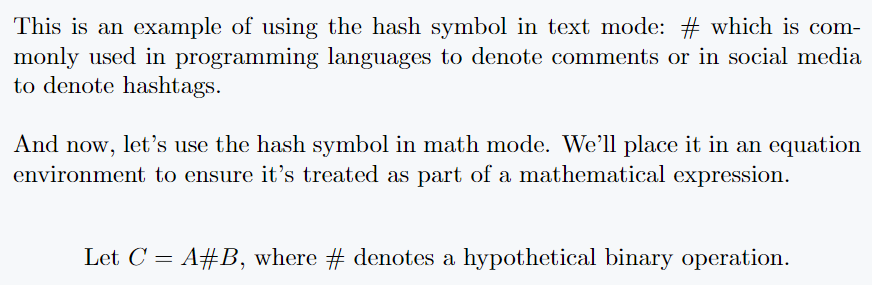
Using texttt command
Note the output above where the structure of hash symbol may not be to many’s liking. Which doesn’t match well with other text or expressions.
\documentclass{article}
\begin{document}
\noindent\texttt{This is an example of multi-line\\ text with this symbol:\# \\ in typewriter font.\#physicsread, C\#, \#latex}
\end{document}
Output :

For this, I will take the help of texttt command which will convert the font style of symbol to typewriter font.
Using verb command
The \verb command in LaTeX is used for verbatim text, which is particularly useful for including special characters exactly as they are, without LaTeX interpreting them as part of its syntax.
But, syntax of \verb command is unique compared to other LaTeX commands. It uses a delimiter character to mark the beginning and end of text.
\documentclass[12pt]{article}
\begin{document}
To comment out code in Python, use the \verb|#| symbol at the beginning.

Special LaTeX characters include : \verb|{ } % # _ &|.

Here is a simple bash command: \verb|echo # This is a comment|.
\end{document}
Output :

In this example, | is used as the delimiter. This tells LaTeX to display # exactly as it is, without treating it as a special character.
The \verb command also ensures that the font used is typewriter font.
Encoding the hash symbol using its ASCII
Encoding the hash symbol (#) using its ASCII value in LaTeX can be accomplished with \char command.
ASCII value of this symbol is 35. The \char command instructs LaTeX to insert a specific character from current font based on its ASCII code.
\documentclass{article}
\usepackage{amsmath}
\begin{document}
\noindent This symbol can be represented as \char35. In math mode, the hash symbol looks like this : $A = B \text{\char35} C$. You can also use the hexadecimal value : \char"23. \\

\noindent Here is a custom command for the hash symbol: \hash.
\end{document}
Output :

Both examples above will produce the hash symbol as output. Here’s a breakdown of each approach:
\char"23: The "23 part represents the hexadecimal value of hash symbol’s ASCII code. In hexadecimal, 35 (ASCII code for hash symbol) is represented as 23.
\char35: Here, 35 is the decimal representation of ASCII code for # symbol. LaTeX understands this directly as the decimal ASCII code.
Using boisik and mathabx packages for # symbol
This symbol is also defined in the external package. For example, there are hash and varhash commands for boisik and mathabx packages. Although both symbols are the same, there are structural differences for both commands.
\documentclass[12pt]{article}
\usepackage{boisik}
\begin{document}

\verb|\#| : \#physicsread \qquad \verb|\hash| : $\hash$physicsread
\vspace{1px}
\verb|\#| : \#physicsread \qquad \verb|\varhash| : $\varhash$physicsread

\end{document}
Output :

I have provided only boisik package example in above code. You can insert mathabx package instead of boisik if you want. Structurally, boisik is the best.
Represent C# symbol
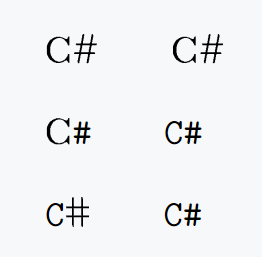
All the methods you have seen so far, I will use them to represent the C# symbol. And you’ll see what’s the best practice!
\documentclass{article}
\usepackage{boisik}
\begin{document}
\noindent C\# \qquad C\char35 \\[10pt]
C\verb|#| \qquad \verb|C#| \\[10pt]
\verb|C|$\hash$ \qquad \texttt{C\#}
\end{document}
Output :


Jidan
LaTeX enthusiast and physics educator who enjoys explaining mathematical typesetting and scientific writing in a simple way. Writes tutorials to help students and beginners understand LaTeX more easily.