

When writing mathematical expressions, scientific measurements, or formulas such as the quadratic equation, you often need the plus-minus symbol(±).
In LaTeX, this symbol is commonly used to represent values that can have both positive and negative solutions.
This guide explains how to write the plus-minus symbol in LaTeX, how it behaves in math mode, how to use the reverse symbol(∓), and how to display it inside normal text.
Table of Contents
Using the \pm Command in LaTeX
The simplest way to insert the plus-minus symbol in LaTeX is by using the \pm command. This command works in math mode and does not require any arguments.
A common example is the quadratic formula.
\documentclass{article}
\usepackage{xcolor}
\begin{document}
   \[ p=\sqrt{a^{2}}={\color{red}\pm}\,a \]
   \[ x= \frac{-b\,{\color{red}\pm}\sqrt{b^2 -4ac}}{2a} \]
   \[ \frac{\partial y}{y}= {\color{red}\pm}\left( n\frac{\partial u}{u} + m\frac{\partial v}{v} \right) \]
\end{document}
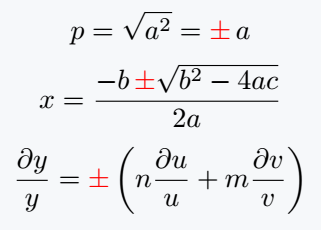
The \pm command automatically produces the ± symbol and keeps the correct spacing within mathematical expressions.
Writing the ± Symbol in Text
Because \pm works in math mode, you normally include it inside $...$ when using it in regular text.
The tolerance of the resistor is $10 \pm 1 \%$.
This is the most common way to insert the ± symbol in LaTeX text.
Inline Math vs Display Math
The \pm command can be used in both inline math and display math environments.
Inline math example
Inline math is used when equations appear inside a sentence.
The equation gives two results: $x = \pm 4$.
Display math example
Display math places the equation on a separate centered line, which is useful for larger expressions.
\[
a \pm b
\]
The Minus-Plus Symbol(∓)
LaTeX also provides the reverse symbol of ±, called the minus-plus symbol (∓). This symbol is produced using the \mp command.
\documentclass{article}
\begin{document}
 \[ a\pm b=0 \]
 \[ \therefore a=\mp b \]
\end{document}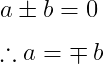
Using ± with Different LaTeX Symbol Packages
Several LaTeX symbol packages provide their own mathematical fonts, but the \pm command remains the same.
Example using the MnSymbol package:
\documentclass{article}
\usepackage{MnSymbol}
\begin{document}
  \[ a \pm b = c \]
  \[ p \pm q = r \]
\end{document}
Other packages that support this symbol include:
- MnSymbol
- fdsymbol
- boisik
- stix
These packages mainly change the visual style of mathematical symbols rather than the command itself.
FAQs
How do you write the plus minus symbol in LaTeX?
You can write the ± symbol in LaTeX using the \pm command in math mode. For example, $a \pm b$ will produce the ± sign in an equation.
What is the LaTeX command for the ± sign?
The \pm command is used to display the ± sign in LaTeX. It works in math mode and is commonly used in equations and measurements.
How do you write the minus plus symbol in LaTeX?
To write the minus plus symbol (∓) in LaTeX, use the \mp command. This symbol is the reverse of \pm and is often used when showing paired mathematical results.
Conclusion
The plus-minus symbol (±) is easy to insert in LaTeX using the \pm command. It is primarily used in mathematical expressions, scientific measurements, and formulas where values can have both positive and negative solutions.
By placing \pm inside math mode, you can use it in equations, inline expressions, and scientific notation.
When you need the reverse symbol, the \mp command provides the corresponding minus-plus (∓) notation.


Jidan
LaTeX enthusiast and physics educator who enjoys explaining mathematical typesetting and scientific writing in a simple way. Writes tutorials to help students and beginners understand LaTeX more easily.